
Change the conditions. Explore the consequences.
Test decisions in an isolated model before committing them to the real world.
Helios Simulation combines versioned state, explicit dynamics, constraints and uncertainty to explore how a system could behave under different conditions. Compare scenarios. Inspect assumptions. Understand what drives the result.You askAdd a shift, arrange alternative supply or do both?
- stressDemand 120. Supply 90. Unmet demand 30.
- shiftOutput stays at 90. Supply still binds.
- supplyOutput 100. Capacity is the next bottleneck.
- bothOutput 120. Unmet demand 0.
Before you change the operation, run the scenario.
Demand increases. A supplier loses capacity.
You can add a shift, purchase additional supply or accept a delay.
- Which intervention addresses the actual bottleneck?
- Which introduces a different one?
Simulation gives you a controlled environment to investigate.
Watch a decision become an experiment.
Demand is expected to rise. Our main supplier may reduce deliveries. Should we add a shift, arrange alternative supply or do both?
01Capture the starting state
Simulation starts from a versioned snapshot. The selected scope includes demand, inventory, suppliers, production capacity and delivery obligations.
| Variable | Illustrative value |
|---|---|
| Demand per period | 100 units |
| Supplier availability per period | 100 units |
| Production capacity per period | 100 units |
The snapshot records sources and observation times.
Missing inputs and stale values are surfaced before the run.
Choose the simulation method that fits the question.
Structural impact
Explore dependencies and rule-based propagation.
If this facility becomes unavailable, which connected orders and obligations are exposed?
Outputs identify affected paths and applied propagation rules. A dependency path is labelled according to the model's semantics; it is not automatically treated as established causation.Quantitative dynamics
Execute supported mathematical, discrete-event or agent-based models.
How do queues, inventory and utilisation evolve over the next thirty days?
Outputs can include trajectories, resource usage, delays and constraint violations.Stochastic scenarios
Represent uncertain inputs with declared distributions.
How sensitive is delivery performance to variability in demand and supplier lead times?
Repeated runs produce model-based distributions and estimated event frequencies. Results retain the sampling configuration and statistical uncertainty.Human-response exploration
Explore possible reactions through explicitly labelled persona scenarios.
What objections might different customer groups raise?
These outputs are exploratory hypotheses. They are kept separate from measured behaviour and calibrated quantitative forecasts.
Separate scenario assumptions from causal estimates.
Changing a variable inside a model explores the consequences of the model's assumed relationships.
Estimating a real intervention effect from observed data requires additional causal assumptions and identification.
Where supported, causal workflows record:
- The causal question.
- The assumed graph and confounders.
- Identification conditions.
- Estimation method.
- Sensitivity and robustness checks.
If the effect cannot be identified under the stated assumptions, Simulation reports that limitation.
Explore uncertainty without hiding it.
Replace a single demand estimate with an approved distribution. Vary lead times, resource failures and other uncertain inputs.
Inspect:
- The distribution of modelled outcomes.
- Estimated frequency of threshold breaches.
- Tail scenarios.
- Sensitivity to individual parameters.
- Differences between competing model assumptions.
Intervals are labelled according to their construction.
A simulated probability remains conditional on the model and its inputs.
Find the assumptions that change the decision.
Ask:
- At what demand level does the second shift become useful?
- How much additional supply is needed before production becomes the bottleneck?
- Which uncertain input contributes most to the result?
Run parameter sweeps and sensitivity analyses.
Identify whether a recommendation remains stable across plausible conditions or depends on a narrow assumption.
Keep every experiment reproducible.
A run records:
| Component | Recorded information |
|---|---|
| Starting state | Snapshot and source versions |
| Model | Equations, transitions and dependencies |
| Scenario | Interventions and parameter changes |
| Randomness | Seeds and sampling configuration |
| Execution | Engine version and run settings |
| Outputs | Results, diagnostics and limitations |
Supported deterministic configurations can be rerun against the same inputs.
Stochastic runs retain the information needed for reproducibility and distribution-level comparison.
Compare the model with observed outcomes.
As real outcomes become available, compare them with the model's predictions.
Inspect forecast errors, parameter drift and scenarios that the model failed to represent.
Changes to parameters or model structure are versioned and reviewed.
Model quality is assessed against relevant observations and the decision it is intended to support.
Explore freely. Promote changes deliberately.
Simulation runs in an isolated branch. A successful scenario can become a proposed plan. Before implementation:
A favourable simulation result does not itself authorise an action.
curl https://api.helios.example/v1/simulation/runs \
  -H "Authorization: Bearer $HELIOS_API_KEY" \
  -H "Content-Type: application/json" \
  -d '{
  "snapshot": "operations@v41",
  "model": "single-stage-capacity",
  "scenarios": [
    {
      "name": "stress",
      "demand": 120,
      "supply": 90,
      "capacity": 100
    },
    {
      "name": "combine-both",
      "demand": 120,
      "supply": 130,
      "capacity": 130
    }
  ]
}'Understand the baseline. Test the intervention. Inspect the consequences.
Asking a what-if.
A what-if question in plain words, run against the current picture.
A screen from the Helios platform, shown as an indication. Names removed. Not a customer result.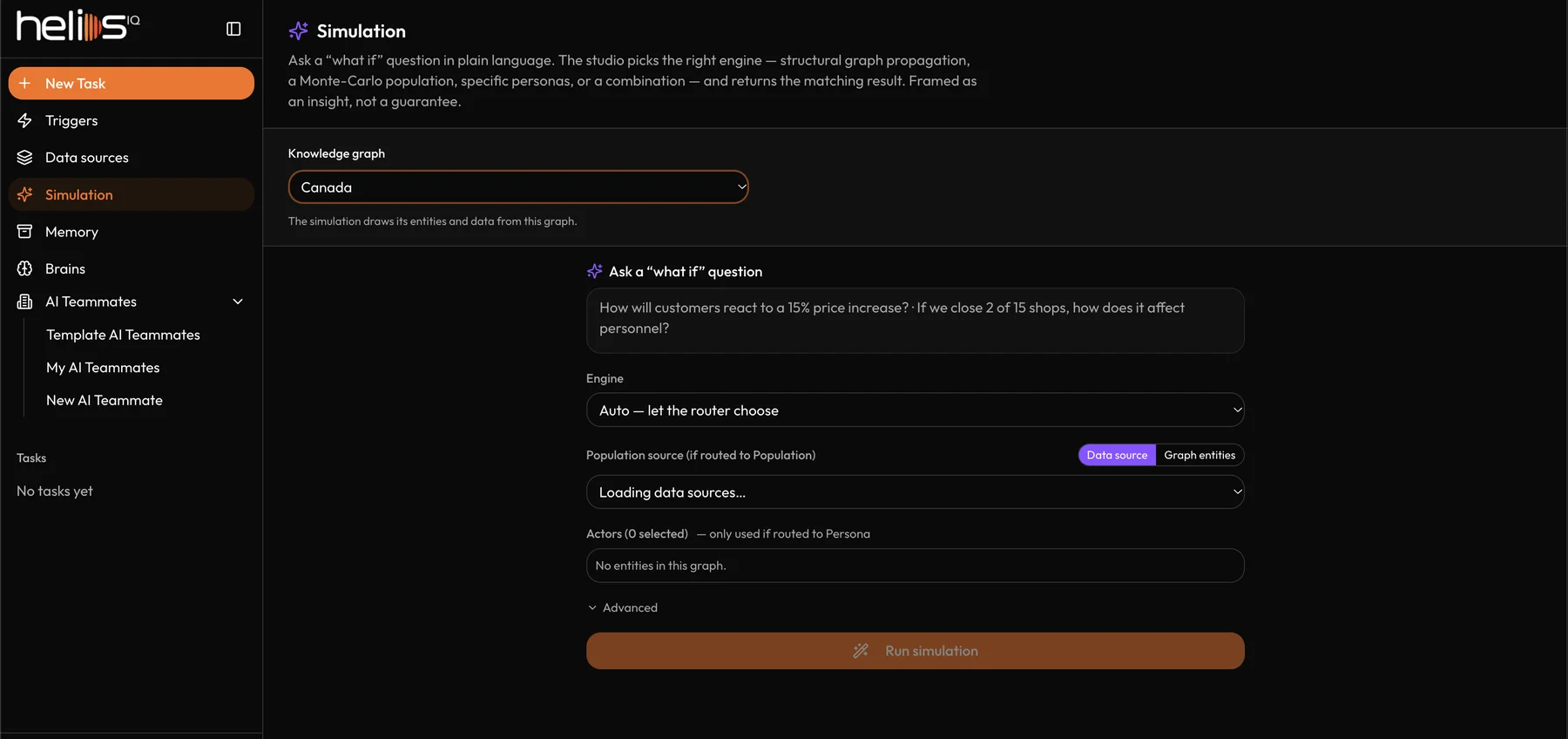
Included in Helios Decisions.
The Simulate module of Helios Decisions. One workspace, one platform fee and one CPU pool shared with Solve.
- Explorer€149/ month
- Team€990/ month
- Business€3,490/ month
- EnterpriseFrom €84,000/ year
Questions, answered.
Is it available today?
Helios Simulation is in early access. Leave your email and we will write to you when access opens. No payment is taken.
Is a simulation result a forecast?
It is a result of the model and its inputs. A simulated probability remains conditional on both. Assumptions, sampling configuration and limitations are recorded with every run.
Can a good scenario change our operation automatically?
No. Simulation runs in an isolated branch. A favourable result does not itself authorise an action. Applying a change requires a new authorised operation.
Does changing a variable show the real causal effect?
Not by itself. It explores the model's assumed relationships. Estimating a real intervention effect from observed data needs additional causal assumptions, and Simulation reports when the effect cannot be identified.
What does the example on this page show?
A made-up capacity question with a simplified model. The numbers are illustrations. No simulation engine runs in your browser and no AI model is called.

Start with one decision worth testing.
Connect a World snapshot or supported dataset. Choose or define the model, declare the assumptions and compare a small set of interventions. Run through an interface or API in a managed, dedicated or customer-controlled environment. Leave your email. We will write to you when access opens.